Can an AI find the mistakes in an HR system?
I planted 127 errors in a fake company of 429 employees, gave an AI read-only access, and ran the same audit five times. This is what it found, what it missed, and where the test falls short.
Summary
The question. If you give an AI access to read the HR system, how many of the errors in the system does it find? Does it flag records that are fine?
The setup. A fake company, Tindra Industrier AS, with 429 employees in the Frappe HR System, running on my own server. 127 errors were planted, each on a different employee. With an added bonus of 11 decoys too see if it would flag healthy users. The decoys could look like -> a pairs of different people with the same name, two married couples who list each other as emergency contact, the chief executive with no manager, and a part-time salary that looks too low.
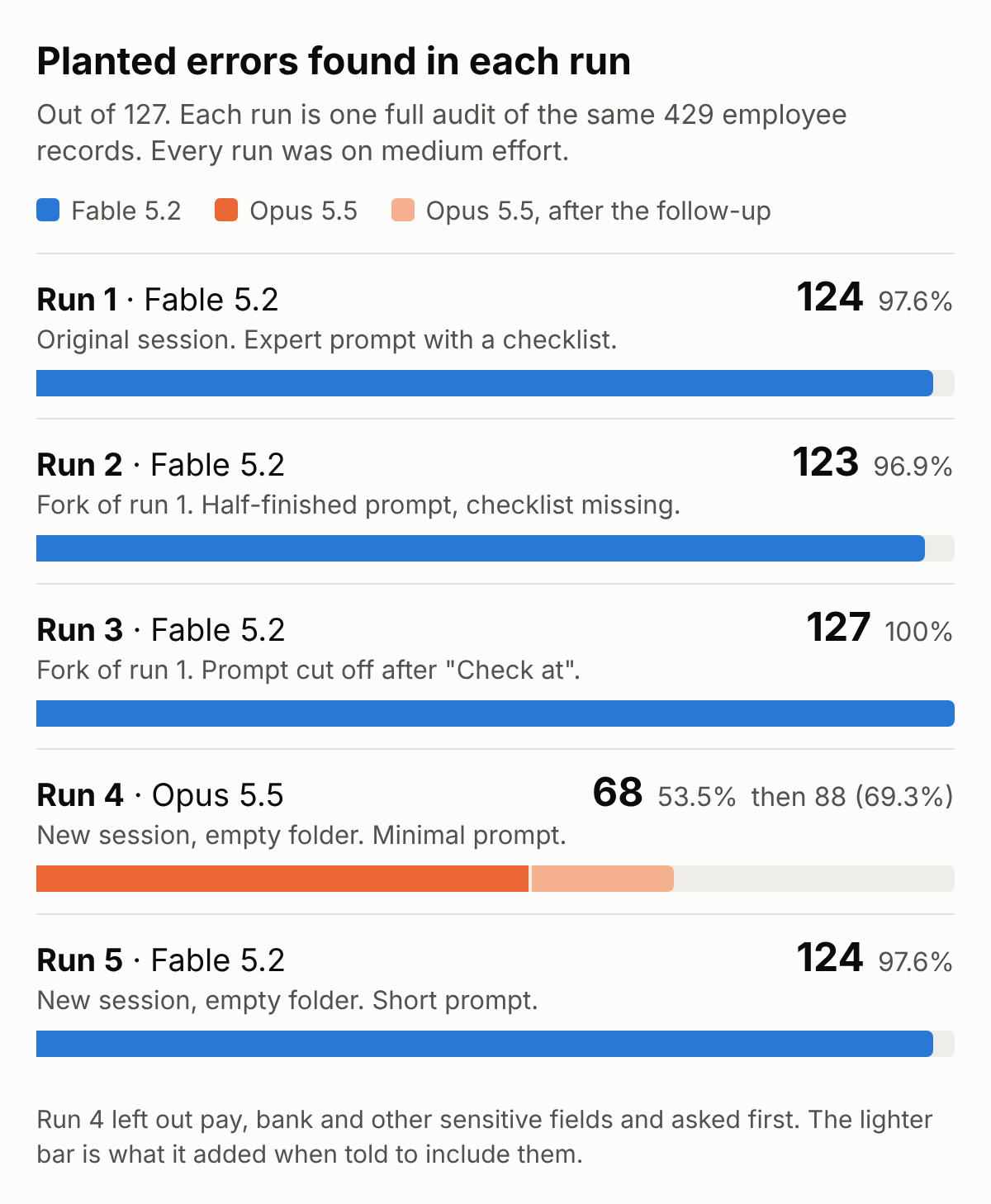
The result. Claude Fable 5.2 found about 97% of the errors in each of four runs, between 123 and 127, with varying degrees of direction in the prompts. 119 of the same errors were found in every Fable run. Across the five runs, every error was found at least once.
False accusations. No run called any of the 11 decoys an error. One run listed some of them as things for a person to confirm. The runs did report problems outside the errors.
What did not change the result. The prompt. Fable got an expert prompt, a half-finished one, one cut off in the middle of a sentence, and one of a single sentence. The scores stayed within 4 error finds of each other (123–127).
The outlier. Run 4 (a happy accident) Claude Opus 5.5, on the same effort setting as the rest, it found 68 errors. In its first analysis it did not check pay, bank or other sensitive fields, and it asked whether I wanted them included. I replied yes, and it reached a total of 88 errors found.
The limits. The errors in the data were designed by Claude and then found by Claude. Because the data was made by an AI, everything outside the planted errors is extremely tidy. So the AI was comparing the errors against a very clean set of records. In a real HR system the data is less tidy, and the outliers may be harder to find. It is one fake company in one system, and I scored it myself. This shows what happens under good conditions. Results will vary from system to system, depending on the quality of the data.
1. Why I tested this
Errors in HR data builds up slowly with time. People move, and nobody updates the address. Salaries are changed in the payroll but not in the HR system, Someone changes bank and doesn't tell HR. Managers make changes themselves, in free-text fields where a drop-down list should have been. One person writes the city with a capital letter and the next one doesn't. HR misspells a name, or a department. A manager quits, and the employees are never moved to a new manager in the system.
The system accepts all of it, because it all looks like data.
Finding errors that have built up-over the years is difficult and tedious, and it is work HR usually never has time for. Therefor I put an AI on the job, to see whether it could find mistakes like these.
In my previous article I explained how an AI connects to an HR system. This article is a study of what it can do once it is inside.
2. The questions
- How many of the planted errors does the AI find?
- Does it flag records that are actually correct?
- If I run the test again, do I get the same result?
- How much does the result depend on how I ask?
3. The setup
The system. Frappe HR, an open source HR system, running on a server at home. where only my own devices can reach it.
The (fake) company. Tindra Industrier AS. Thirteen departments and 429 employees, of whom 394 are active and 35 have left. Every person, salary and bank account is of course fake.
The planted errors. 127, each on a different employee. The answer sheet contains levels of severity:
- High, 45 errors. For example a salary with one zero too many, or a contract that has ended while the employee is still listed as active.
- Medium, 54 errors. For example a misspell surname, or an employee with no department.
- Low, 28 errors. For example a postcode that does not match the town, or a name written all in capitals.
The decoys. 11 records were built to look wrong but are actually correct. For example a salary far below colleagues with the same job title, which is right because that person works part-time. Or a married couple who both work here and list each other as emergency contact, so each one's emergency number is a colleague's mobile.
The access. One API key, belonging to a user that can read employee records and nothing else. The AI could not change, add or delete anything, and that limit sits in the HR system, not in the AI.
Where the AI ran. In Claude Desktop on Windows in a virtual machine inside the same server, in a mode where it can run commands and save files.
Technical note: The usual way to connect Claude to a system is a connector. Anthropic's guide says that connection is made from Anthropic's servers, not from your own machine. The address of my HR system only works inside my private network, so Anthropic's servers cannot reach it. A program installed on a machine inside the network can. Claude Desktop on the Windows machine fetched the records itself, with the API key, and sent what it read on to Anthropic.
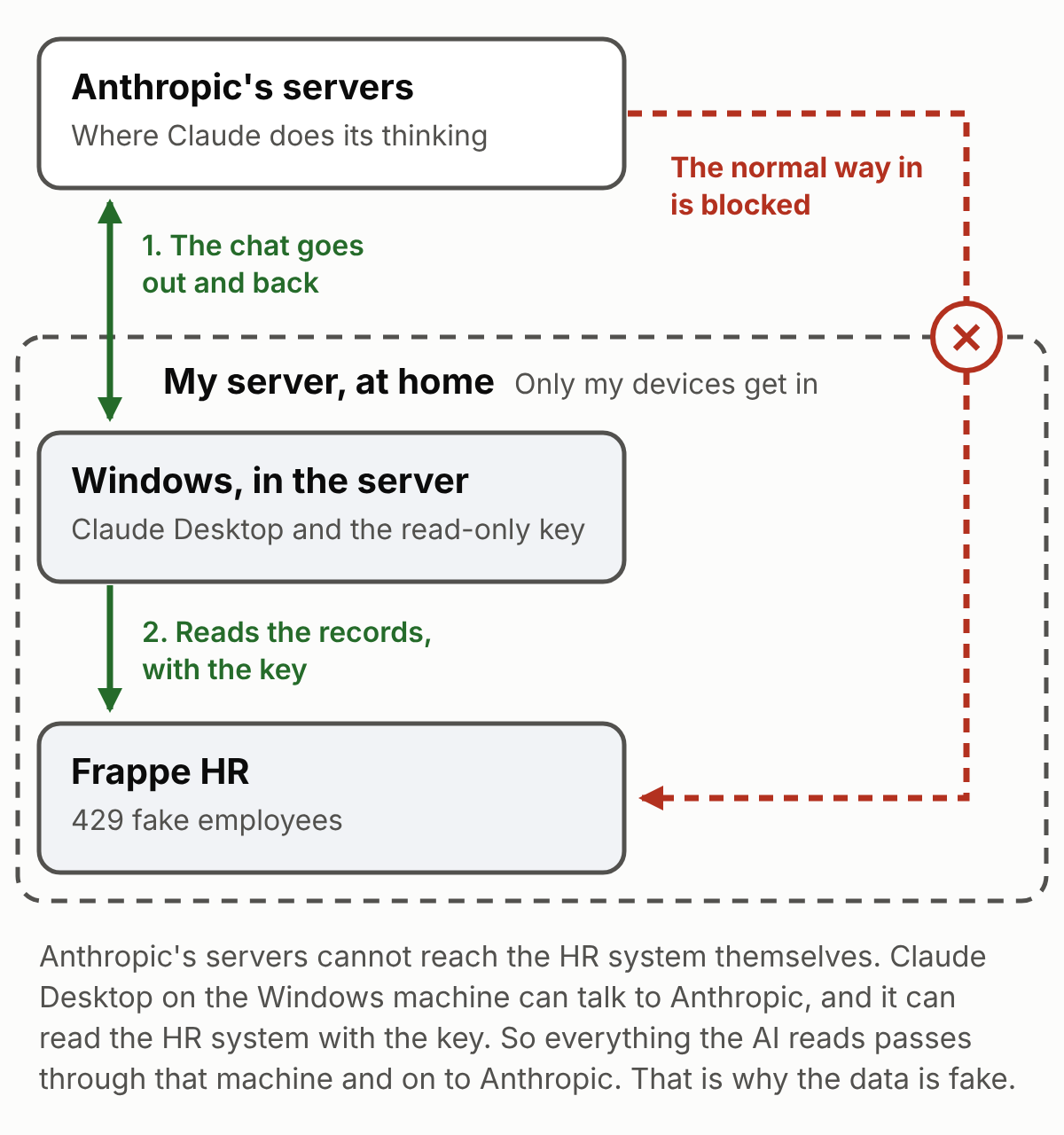
One thing follows from this. What the AI reads is sent to Anthropic’s servers, because that is where it does its thinking. My Claude plan is not commercial and probably does not come with a data processing agreement (DPA) and standard contractual clauses (SCC). Therefor I will only be using fake data.
4. Method
4.1 Making the errors
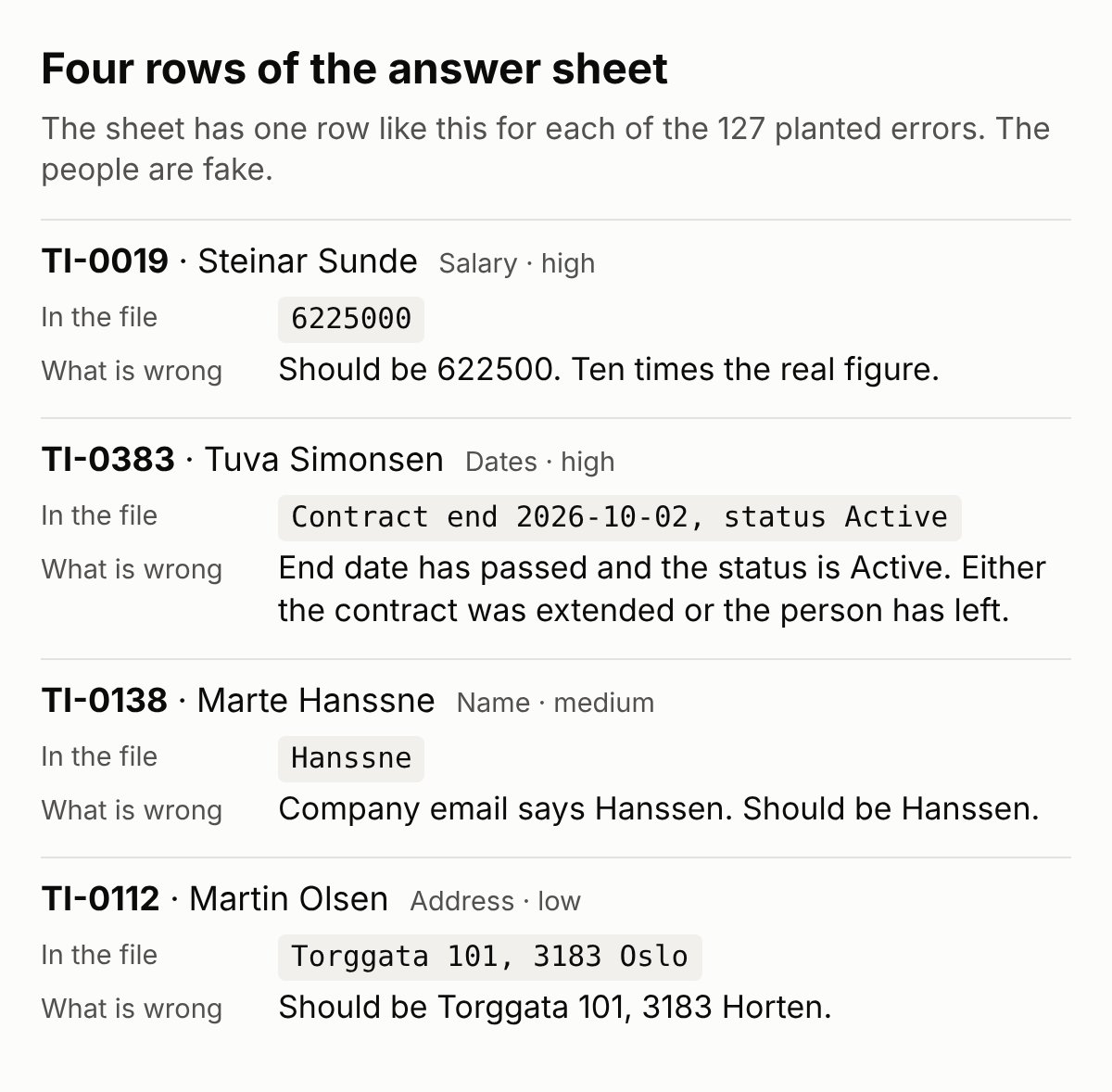
I had Claude draft 433 fake employees with a range of errors in them, and an Excel sheet listing every error: who, which field, what is wrong, and what it should be. I call that the answer sheet. I went through both side by side before anything was imported, checking the planted errors and the rest of the fake employees.
The errors are the everyday kind:
- a surname misspell in one field, or in every field
- a pay value with a zero too many, or a placeholder left in
- a postcode that belongs to another town
- a bank account number with a digit missing
- a manager who has left, or a job title that does not fit the department
- a contract that has ended while the employee is still active
4.2 What the system stopped
When I imported the spreadsheet the sysstem, Frappe refused four employees, because their salaries were written with a space or a dot between the thousands. I concluded i had enough errors in the data and left those four out. That is how 433 became 429. I then corrected the answer sheet to match what was really in the system. That is version 2, with 127 errors, and it is the one every run was scored against.
4.3 The five runs
All five runs used the same effort setting, medium. Each prompt is shown as I sent it. Runs 4 and 5 also began with the address of the HR system and the API key, which I have left out. Skip the grey boxes if you only want the results.
Run 1: Fable 5.2 "expert prompt". The session where I had set everything up.
Act as an HR data auditor for Tindra Industrier. Go through ALL employee records in the system — every one of the 429, not a sample — and find every data-quality problem you can. Check at least:
- salary/CTC outliers (too high or too low for the role, or compared to peers in the same role/department)
- missing or empty critical fields (CTC, manager, department, date of joining, contract type, email)
- impossible or suspicious dates (hired before born, future dates, under-18 or 80+ employees, joined before the company plausibly existed)
- manager problems (employee reporting to themselves, to a non-existent or inactive employee, circular chains)
- duplicates (same person twice under different IDs, shared emails or national IDs)
- inconsistencies (department vs role mismatch, status "Active" with a leaving date, gender/title mismatches)
- anything else that looks planted or broken
Work systematically through the whole dataset in batches. Produce a final report as a table: Employee ID, Name, Issue, Severity (minor/medium/high), and Why it's flagged. End with a count of total issues found by category. Do not stop early — completeness matters more than speed.
Run 2: Fable 5.2 half-finished prompt. A fork of run 1. A fork is a copy of the conversation taken from just before I sent the audit request, so it starts with no report in front of it. I took the checklist out.
Act as an HR data auditor for Tindra Industrier. Go through ALL employee records in the system — every one of the 429, not a sample — and find every data-quality problem you can. Check at least: and Why it's flagged. End with a count of total issues found by category. Do not stop early — completeness matters more than speed.
Run 3: Fable 5.2 cut-off prompt. A second fork, taken from the same point. The AI noted that the prompt had been cut off, and carried on.
Act as an HR data auditor for Tindra Industrier. Go through ALL employee records in the system — every one of the 429, not a sample — and find every data-quality problem you can. Check at
Run 4: Opus 5.5 minimal prompt. A new session in an empty folder.
Do not read any existing files, notes or memory. Analyse all employee records and report any data-quality problems you find.
There were no existing files or notes for it to read. The folder was empty, and that line was only there to be safe.
Its report said it had left the sensitive fields out, and asked whether I wanted them included. I responded yes.
Run 5: Fable 5.2 clean repeat. A new session in an empty folder.
Do not read any existing files, notes or memory. Act as an HR data auditor for Tindra Industrier. Go through ALL employee records in the system, every one of the 429, not a sample, and find every data-quality problem you can.
4.4 How separate the runs were
- Runs 4 and 5 were fully isolated: new sessions in empty folders, with an instruction not to read anything else, even though there was nothing to read.
- Runs 2 and 3 did not have run 1's results in their conversation, because they were forked from before the audit. But they ran in the same folder as run 1, and run 1's files were most likely still in it.
Run 3 said it never opened those files, and the visible log in run 2 and 3 shows no files being read. An AI's account of its own work is not proof, so I count this as unverified.
That is the reason runs 4 and 5 were isolated. Run 5 had nothing to read, and it scored the same as run 1, with a much shorter prompt.
4.5 Scoring
I compared each report with the answer sheet.
- Found means the report names the record and the right kind of problem. If the AI found it but added "please check this", I still counted it as found.
- A decoy counts as wrongly accused only if the report calls it an error outright. "This looks odd, please check" does not count as an accusation.
- Severity is always the answer sheet's severity, never the label the AI chose.
- One exception. Run 3 listed the three postcode errors by address, without employee numbers. Each address appears once in the data, so I counted them as found. If scored strictly, run 3 would drop to 124 for not naming the specific employee.
5. Results
5.1 All runs
5.2 The main result
In four runs, Fable 5.2 never found fewer than 123 of the planted errors. 119 of them were found in every run. The other eight were each found in at least one of the runs, so nothing was beyond reach.
5.3 By severity
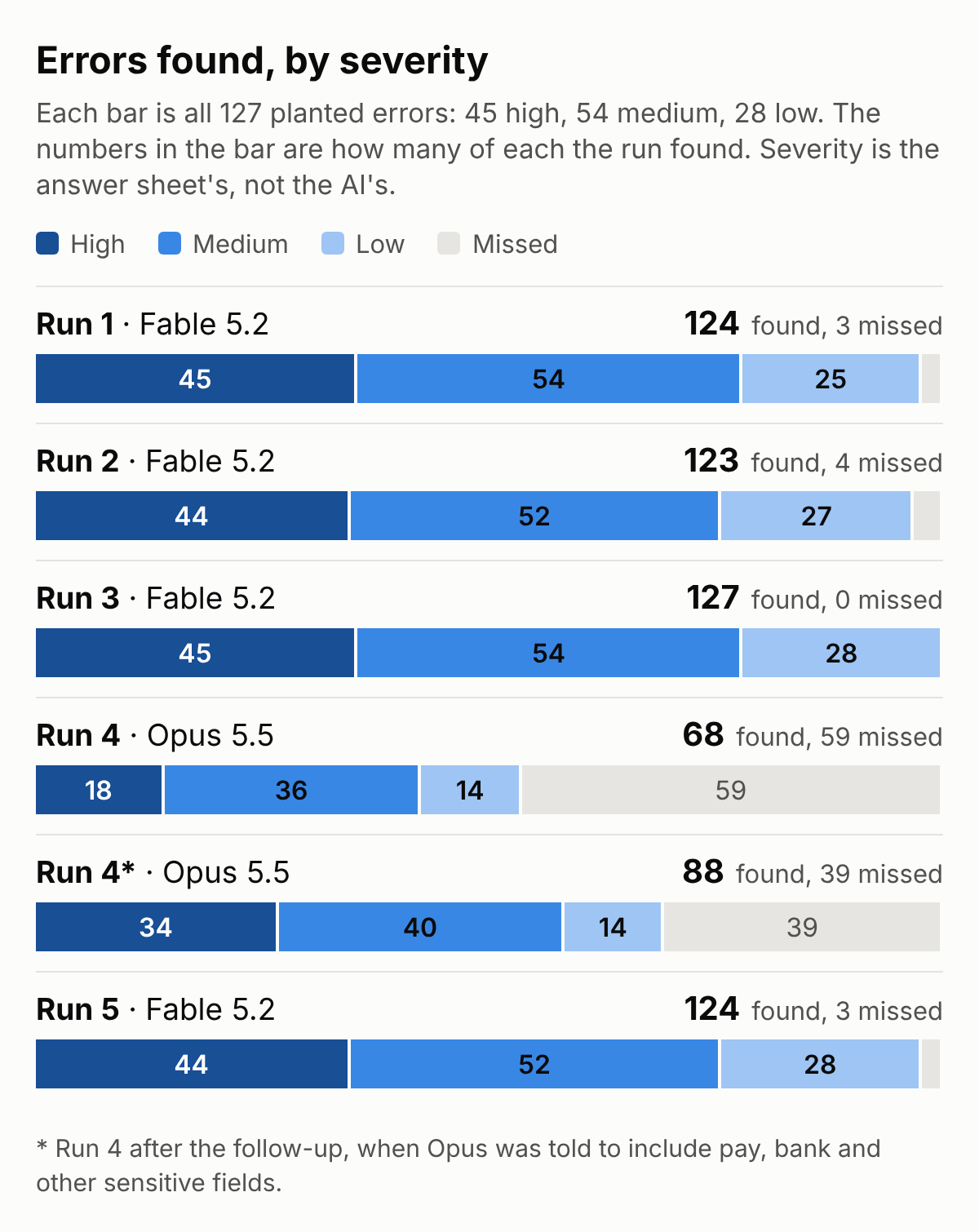
Every Fable run found at least 44 of the high-severity errors. Two runs missed the same one: a birth date of 1 January 1970, which is a value some systems fill in by default.
5.4 The eight errors that were missed by Fable
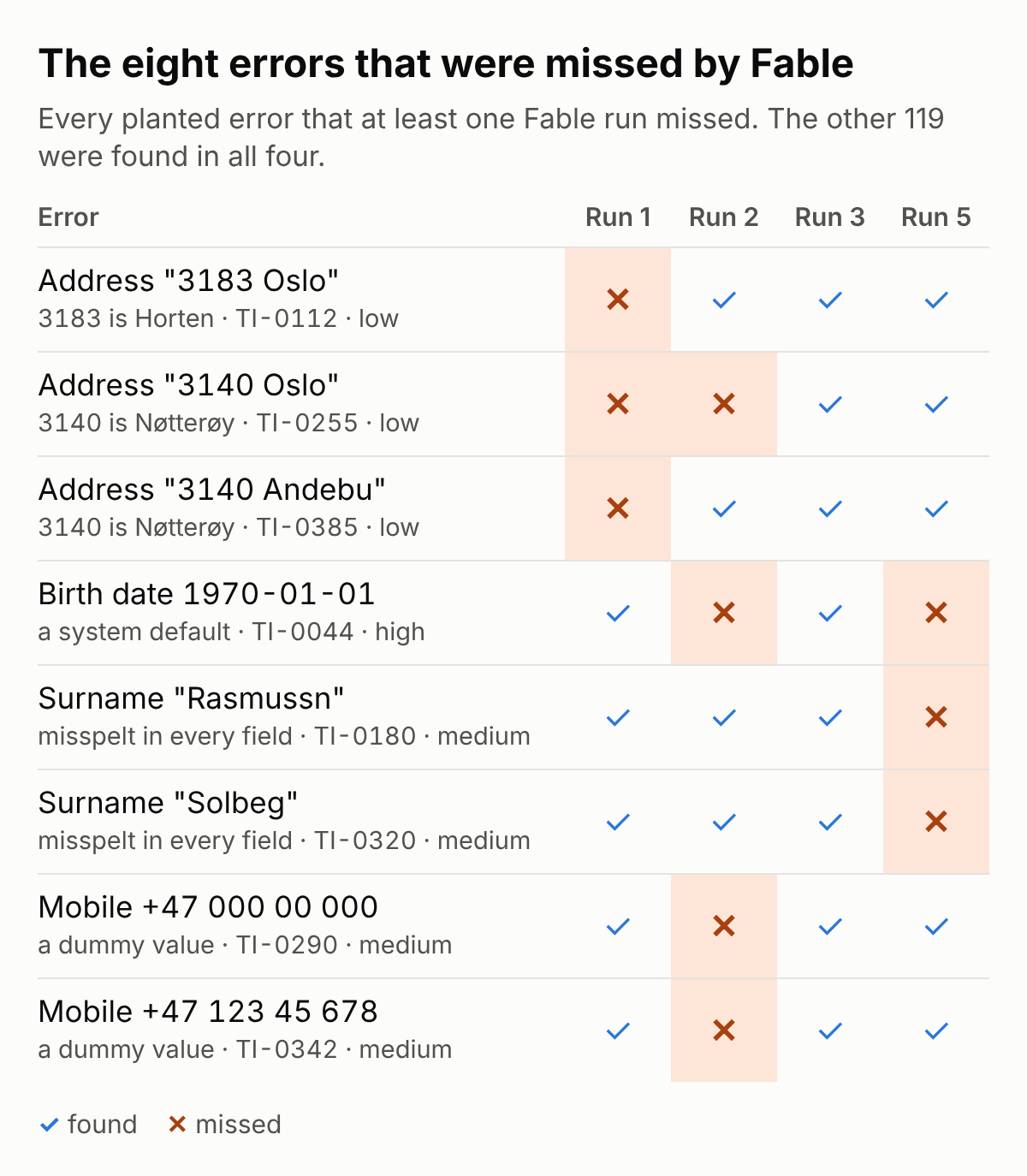
The misses seems to come in groups of the same type. A run either checks for dummy phone numbers or it does not, so the two phone errors move together. The two surnames do the same.
5.5 The two I thought AI would not find
TI-0180 and TI-0320 are surnames misspell in every field, including the email address. I categorised these as not detectable, because the same mistake runs through every piece of information in the profile.
But there were clues. "Rasmussn" should be Rasmussen, and "Solbeg" should be Solberg. Each correct spelling is carried by two other employees. And the Solbeg record names a spouse as emergency contact, with the surname spelt correctly: Solberg. So the data held clues, but not ones I thought an AI would pick up.
Runs 1, 2 and 3 found both, by noticing that nobody else in the company shared that spelling. Run 5 missed both. So did run 4, Opus, before and after the follow-up.
5.6 Decoys
No run called a decoy an error.
Run 1 was the only one that listed decoys among its findings. Each time it graded them minor and marked them for a person to confirm. For example, on two people with the same name: "probably two people, but confirm". The other runs either left the decoys alone or named them as expected exceptions.
The file also holds two more pairs of namesakes that nobody planted, and that are not among the 11 decoys (TI-0232 and TI-0415, TI-0202 and TI-0429). No run called either pair a duplicate. Run 1 listed them under a category it named "Duplicate", but its own note on them says "probably two people, but confirm". Run 3 named them as different people. Runs 4 and 5 mentioned namesakes in general and did not count them as errors. Run 2 did not mention them.
For curious minds: namesakes is defined as : one that has the same name as another
5.7 Problems that were not in the answer sheet
The Fable runs also reported real problems that the answer sheet does not list (Yes, these mistake were my fault). Not every run reported every one of them.
Two come from how the salaries were written in the import file:
- Four missing employee numbers. Four salaries had a space or a dot between the thousands. Frappe refused those records and I skipped them. The AI noticed the gaps in the numbering.
- Two pay values with stray decimals. Two other salaries were written with a decimal comma. Frappe accepted those, and the AI noticed the odd decimals. I had taken these two off the answer sheet, because on screen the figures looked right. My mistake.
The rest are accidents in the fake data that i didn't catch in the creation of the answer sheet.
- Two more employees listed as their own emergency contact. Both have an emergency contact with exactly their own name, registered as their daughter. The answer sheet has two planted errors of this kind. Every Fable run flagged all four.
- "Retirement" as the reason for leaving, for three people who were between 33 and 49 when they left.
- "Temporary contract expired" as the reason for leaving, for nine people recorded as full-time.
- A son or daughter as emergency contact for seven employees aged 19 to 28.
- Three former full-time employees recorded on about half the usual pay for their job.
All of these findings make sense, and they should be flagged. But they were not on the answer sheet, so I have not counted them as extra points. I have also not gone through every extra finding in every report, only the kinds listed here.
Opus reported the "four missing employee numbers" and nothing else from this list.
5.8 The prompt made no measurable difference
Look at the four Fable rows in Figure 3. The prompts go from an expert checklist, to a half-finished one, to one cut off in the middle of a sentence, to a single sentence in an empty folder. The scores barely move, and they do not move in step with the prompt.
5.9 The Opus run
Opus 5.5 found 68 of 127.
It left out bank, salary, passport and health fields on purpose, because they are sensitive. It said so in its report, and asked whether I wanted them checked as well. In all, four whole categories went unchecked: addresses, emergency contacts, pay and bank details.
When I said yes, it checked the sensitive fields by script and reported only employee numbers and the type of problem, never the values. It then found every bank error and 8 of the 10 pay errors, and the total rose to 88.
39 were still missing: 9 addresses, 8 dates, 8 names, 7 in organisation (such as a missing department or manager), 2 emergency contacts, 2 phone numbers, 2 salaries and 1 duplicate.
It also gave one wrong all-clear. It reported that every pay value was positive. One employee has a pay value of 0.
5.10 It ranked the findings without being asked
Run 1 asked for a severity column. Run 5 did not ask for severity but still sorted its findings into high, medium and low. So I asked it where that came from.
From me. The priority labels are my own judgement; they don't come from Frappe HR, from your instructions, or from any formal standard.
It then gave its rule. High meant the error could cause a wrong payment or a wrong headcount, or the value was impossible. Medium meant the record was wrong in a way that affects HR processes, but not tied to money. Low meant contact and formatting problems that are easy to fix.
5.11 How it worked
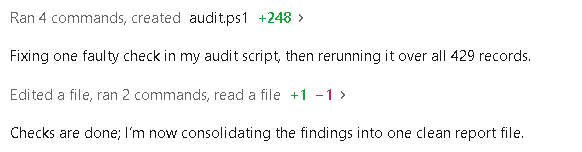
The AI did not read 429 records one by one. In each run it wrote its own checking programs and ran them over all the records. In run 1 it found a fault in one of its own checks, fixed it, and ran it again. In run 5 it downloaded all the records twice and confirmed that the two copies matched. Run 1 took about ten minutes.
6. What the runs show
Fable finds about 97% of the planted errors, repeatedly. Four runs landed within four errors of each other.
It did not need to be told what to look for. A rule-based checker can only find what someone has told it to look for. Here a prompt that stopped in the middle of a sentence did as well as a targeted one. The AI wrote the checks itself, from knowing what normal looks like.
It found errors I didn't catch myself, but that happened to be there. Two employees were listed as their own emergency contact by accident. The answer sheet had missed them, and so had I. Every Fable run found them.
An AI may hold back on sensitive data on the first ask. Opus left out pay and bank details, said so, and asked before touching them. I think that is the right instinct. But it means the first report was not the whole audit, and the wrong all-clear on pay shows the risk. "No problems found" can mean clean, and it can mean not looked at.
The severity labels are the AI's own. Unless you give it a scale, it makes one up. Run 5's scale was sensible, and it was open about where it was unsure. But it is the AI's view of what matters, not your organisation's.
The AI finds. A person fixes. The AI knows what looks wrong. It does not know what is right. In one case the AI flagged that a postcode and a town did not match, which was correct. The suggestion it made, on the other hand, was incorrect. It suggested changing the postcode, when the town was the mistake. Every finding still needs someone to check it.
7. Limits
I have sorted the limits by four questions.
Does it measure the right thing?
- The errors were designed by Claude and then searched for by Claude. That may raise the score. Real HR errors are made by rushed people, old imports and system migrations. A 2025 study on testing data-cleaning tools found that errors written by rule, or by an AI model with no special training, match real errors less closely than errors from a model trained on real examples. Mine were written by an AI model with no special training.
- The correct records are too tidy. In the 302 records with no planted error, every phone number, account number and address is written in exactly the same way. So anything that breaks the pattern stands out. In a real system the correct records are messy too. This test cannot say how many false alarms a real system would give.
- Every planted error sits alone on its own record, and about one record in three has one. I have no idea how many mistakes a real system usually holds.
- None of the 35 employees who have left had a planted error.
- The answer sheet was not complete. I missed a few errors (5.7). I only count what is on the answer sheet, so the other problems the AI found are not part of the score.
Could something else explain the result?
- Runs 1 to 3 all started from a conversation in which two of the planted pay errors had already been found. Leaving those two out would reduce each of those three counts by 2 error finds.
- Run 1's output files were within reach of runs 2 and 3 (4.4.).
Can this be replicated in other HR systems?
- It is one company, one HR system, 429 records, and fake data. Real systems have years of half-finished changes in them.
- The test only covered the employee record. It did not cover contracts, documents or payroll runs.
Would someone else get the same result?
- I scored every run myself. Nobody has checked my scoring.
- I never ran the exact same prompt in the exact same setup twice. So I do not know how much the score moves by pure chance.
- Every run looked for the same 127 errors. I do not know how the score would move with a different set of errors each time.
8. What this means for HR
- Fable 5.2, with read-only access, finds about 97 of every 100 planted errors.
- It did not need a checklist. But you should focus on what it may have left out. One run held back pay and bank details and asked before touching them. That is good behaviour, and it also means the first report was not the whole audit.
- Give it your own severity scale. If you don't, it will use its own.
- Treat an all-clear as a claim, not a fact. One was wrong here.
- Expect more false alarms than I saw. My correct records were all written the same way. Yours might not be.
- Keep a person on every finding. The AI points. Someone has to decide.
If you are wondering what it would take to connect an AI to your own system, that is what my previous article is about.
9. For a potential next tests
- New errors planted. 20 to 30 new errors on new records.
- Both models with similar prompts, on different effort settings. Every run here was on medium. Running each model on low and on high, for example, would show how much the effort setting matters.
- Run 5's setup repeated three to five times. Run 5 was in an isolated folder, with no access to earlier files. Repeating it would measure how much the score moves without worrying about "cheating".
- The same test on untidy data. A file where the correct records are messy: Mixed phone formats, old address styles, optional fields left empty. That is the test of false alarms.
10. How to repeat this
You need an HR system you control with an MCP, a fake workforce, an answer sheet written before the test, a user that can only read, an API key, and a prompt. The prompts are in section 4.3.
The fake workforce and the answer sheet can be downloaded here. There are six files: departments, job titles, locations, the 433 employees, the reporting lines, and the answer sheet.
Everything in the files is fake. The phone and account numbers are random, so some of them will match real ones by coincidence. Please do not call them.
I will also add a personal write-up of the homelab build on my Persalia site: how I set it all up, the mistakes I made, and the problems that came up along the way. That one is for those who are interested in homelabs.
Written by Ronny W. Andersen. Everything I tested ran on my own server, with a made-up company and made-up people. If something here is wrong or out of date, I want to know.